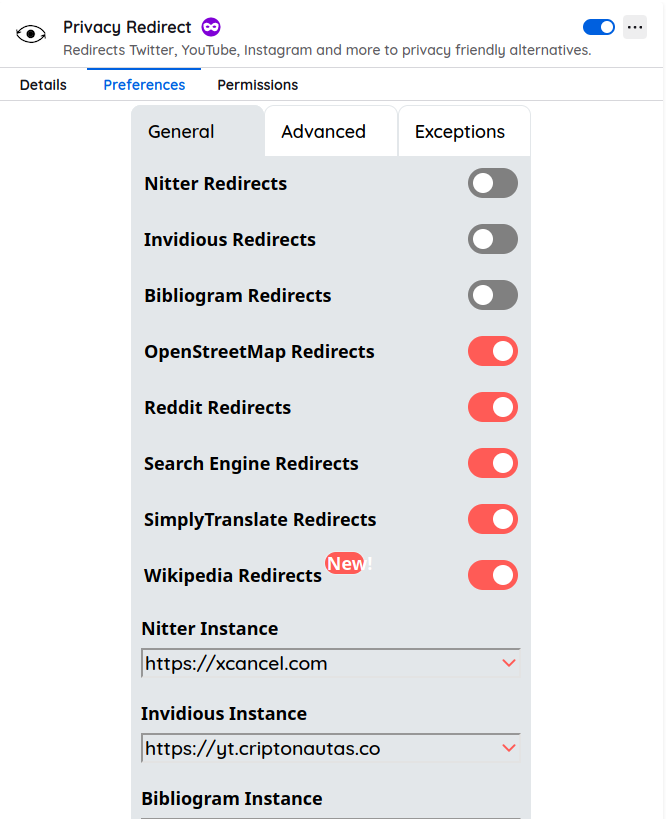
Privacy Redirect - Social media without tracking

If you access links hosted on Apple, Google, Microsoft, Facebook, Wikipedia, and similar services, you will be leaving your footprint on information and data giants.

And that is very risky (!)

We solve it in two clicks

Using Privacy Redirect, which is a browser extension that redirects links from various services to private ones.

These services can be self-hosted or shared within the community :slight_smile:

  • Works on Chrome/Chromium and Firefox.
  • Allows activating and deactivating each of the redirections (in case a service stops working).
  • Occupies very little memory space and is open-source.

You choose which one to use (and if not, you change it)

The extension will use random instances by default, which do not always work.

You can use ours by choosing them from its configuration panel:

Clients in Criptonautas

https://wk.criptonautas.co

https://rd.criptonautas.co

https://so.criptonautas.co

Third-party clients

Nitter instances

Invidious instances

OpenStreetMap tile servers

Google Alternative

https://search.criptonautas.co

Download Links

https://addons.mozilla.org/en-US/firefox/addon/privacy-redirect/

https://chrome.google.com/webstore/detail/privacy-redirect/pmcmeagblkinmogikoikkdjiligflglb

Alternative for 2025

2 Likes

Okay, tenemos una instancia nueva de Reddit, luego de que bloquearon el software anterior:

image

https://rd.criptonautas.co/

Reddit es el intercambio (masivo) mÔs real que encontramos hoy en internet porque buscadores y FB no muestran información.

2 Likes

Reddit agregó nuevos bloqueos

Y eso limita leer los comentarios de personas de manera libre, sin usar su software o pagar por su servicio.

EDIT 28/07/24

Cliente Criptonauta operativo luego de algunos hacks en nuestro server :slight_smile:

2 Likes

LibreDirect incorporates many more clients (Genius, Medium, GitHub, Tumblr, Imgur, and even Soundcloud).

It’s fully open-source and super updated.

https://libredirect.github.io/

Works on Firefox and Chrome

https://addons.mozilla.org/en-US/firefox/addon/libredirect/

1 Like

:wave: What a great contribution, I didn’t know something like this existed. I love it when these tools are shared. Thanks!

For now, I’m not using it, but I got curious, so I’m going to try LibreDirect and then I’ll tell you more about my experience.

At the moment, I’m trying to install Privacy Redirect in Chrome (Mac), but the button appears disabled. Since I don’t want to activate developer mode (at a cost $$$), I tried other options: LibRedirect worked perfectly for me in Firefox.

For those who want to start without complications, using Firefox + LibRedirect can work.

Investigating a bit, I was surprised by everything you can do to browse without leaving traces:

  • I find the idea that you can continue watching content without feeding the system that tracks you powerful.
  • For those who are not as involved in privacy (like me), these tools show you that you don’t need to be a cybersecurity expert to protect your digital freedom.

:mag_right: As part of my mini-research, I’m leaving you with similar alternatives for mobile that I found (not tested):

  • F-Droid (Play Store alternative, with free apps)
  • NewPipe (free and ad-free replacement for YouTube)
  • RedReader or Infinity (free clients for Reddit)
  • Nitter.net in browser + direct shortcut as an app
  • DuckDuckGo Privacy Browser (blocks trackers by default)

I still have a lot to understand, but clearly, these types of tools empower us to stop feeding the algorithm and start choosing how we browse.

Thanks for planting this seed :rocket:

Pura Vida!!!

1 Like

There are some options in Firefox to disable (they call it telemetry).

They changed their Terms and Conditions, it’s tremendous!

The plan is to have a lot of 5-min video content showing how everything is installed and organized :love_you_gesture:

The most private is Tor, then Librewolf, then Firefox with a lot disabled.

In Chromium there is Vanadium (on GrapheneOS), a Degoogled one, Mac is directly not private anymore.

Everything goes through Safari at a technical level and the same with Chrome and Google. Everything is extremely monitored and ā€œtrainingā€.

The path of learning is cool, even more so if we share it.

There are guys who are very involved and super dedicated.

1 Like